In Alguna, a plan is a set of products and preconfigured prices with any other applicable options. They are used to represent your pricing offering for different packages in a more structured way that can be re-used for two or more customers without having to build the plans from scratch. Usually helpful to be used as a baseline to:
  • Self-Serve Subscriptions
  • Custom Plan Templates
Please make sure that you’ve configured products, before starting to create plans for your customers.

Create a Plan

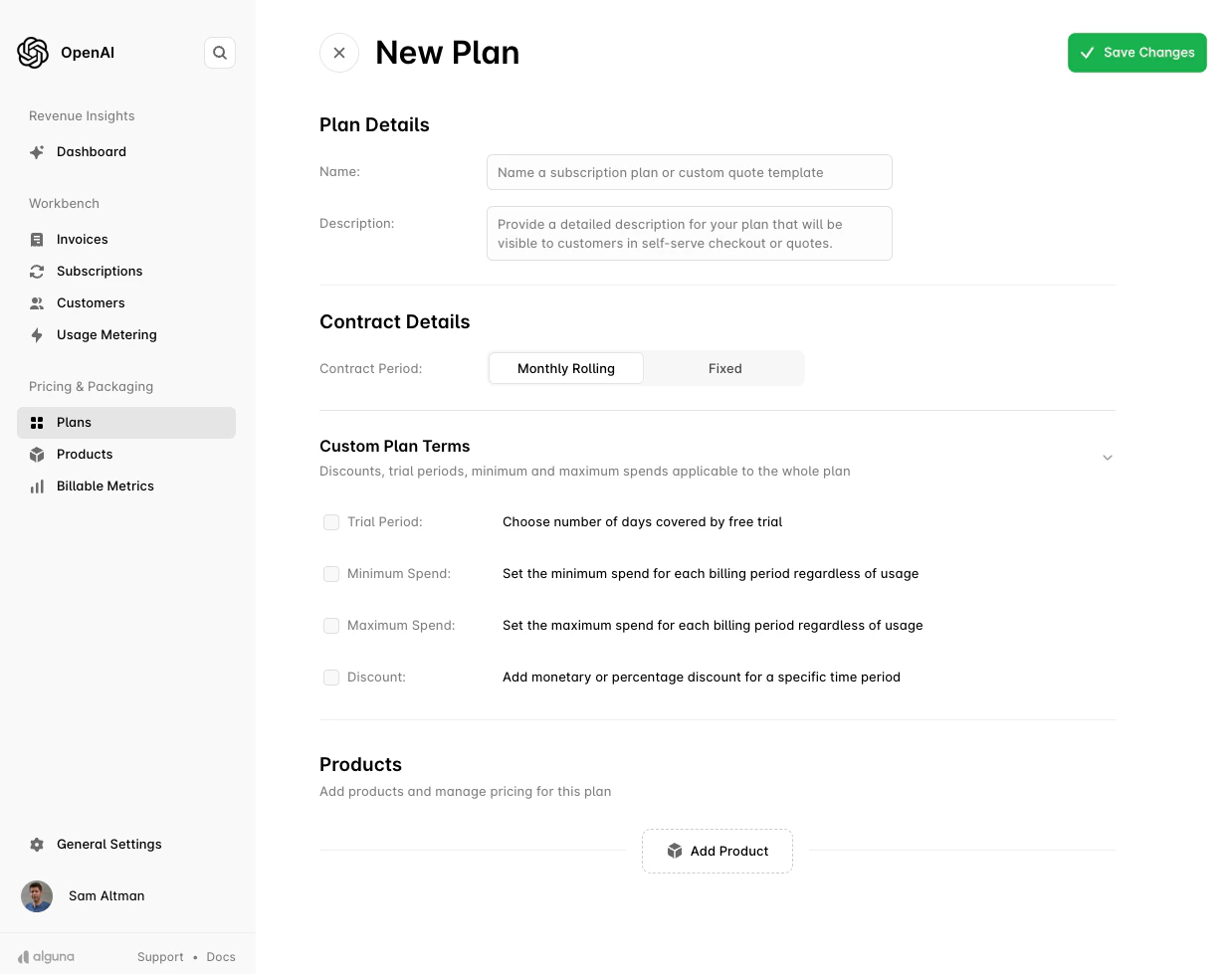
To create a new plan, navigate to Production or Sandbox and click the New Plan button.

Plan Details

  • Name: Enter a clear and descriptive name for the plan. This will be visible to customers during checkout or in quotes.
  • Description: Provide a detailed description of the plan. This should outline what the plan offers and any key features customers need to know.

Contract Details

  • Contract Period: You can choose between two contract types:
    • Monthly Rolling: The contract renews monthly and has no fixed term.
    • Fixed: Set a specific number of months or years for the contract duration.
This flexibility allows you to offer different types of contracts depending on customer needs, whether they prefer a rolling agreement or a long-term commitment.
Plan Creation Screen

Custom Plan Terms

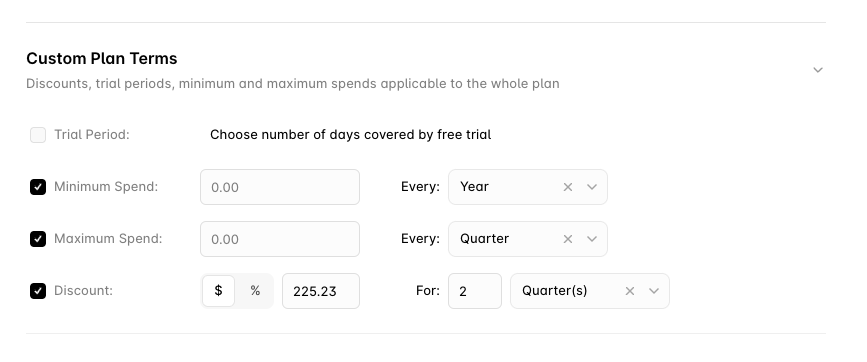
You can set specific terms that will apply to the entire plan. These include:
  • Trial Period: If offering a free trial, specify the number of days the trial will last. During the trial, the customer is not charged.
  • Minimum Spend: Set a minimum spend that the customer must reach during each billing period, regardless of their usage. This ensures a base revenue for the plan.
  • Maximum Spend: Optionally, you can cap the maximum amount a customer is billed in each period, limiting the charges for a specific billing cycle.
  • Discount: Apply a discount to the entire plan. This can be a monetary amount or a percentage off for a specified time period.
These terms provide flexibility in how the plan is structured, enabling you to offer promotional pricing, free trials, and controlled spending limits.
Plan Contract Terms

Add Products to the Plan

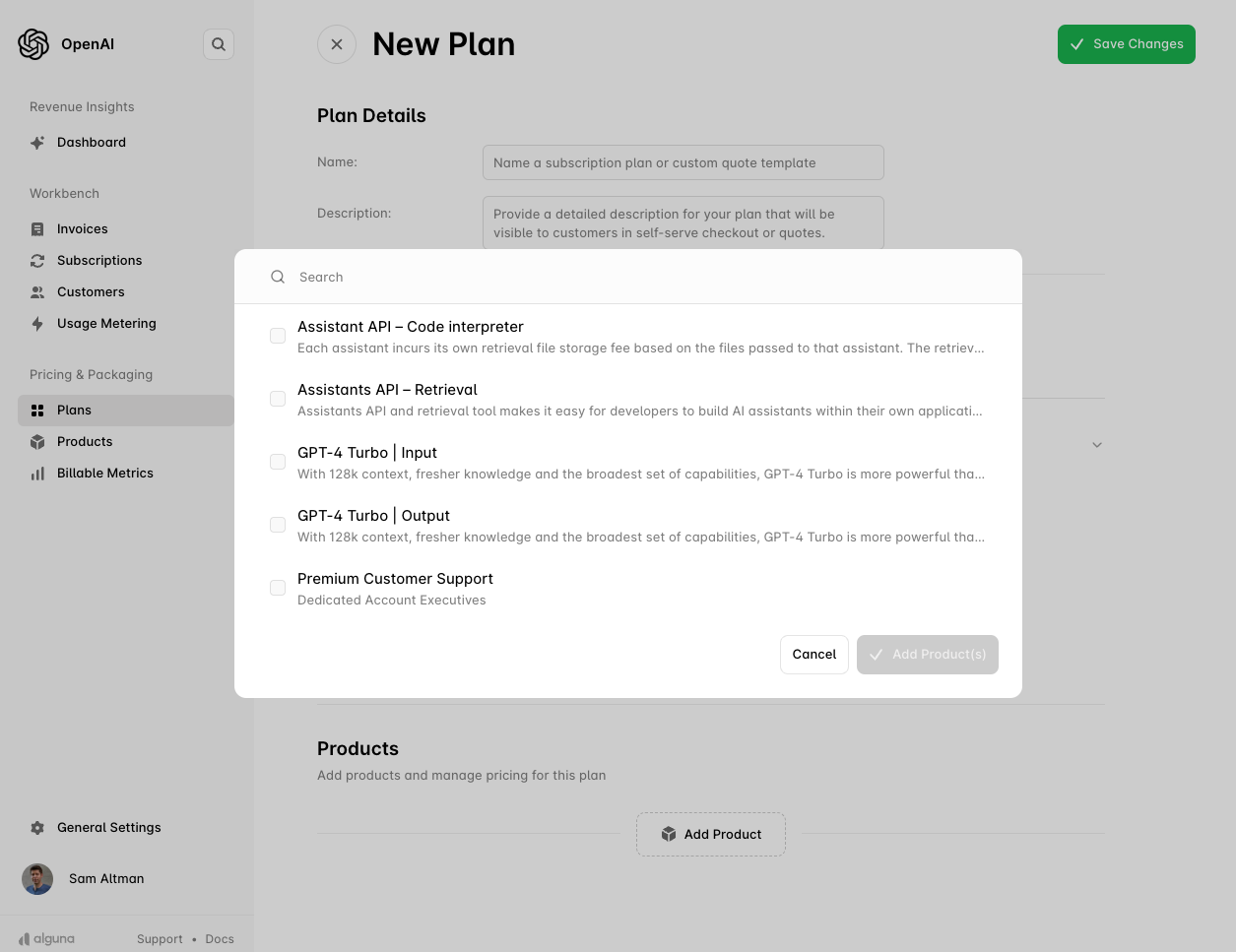
Once your plan details are set, you can add products. To do this, click the Add Product button. A modal will appear where you can search for the products you want to include in the plan. Select the products and click Save to add them to the plan.
Add Products to Plan

Fixed Products

When adding a fixed product, you can:
  • Set the Fee: Define the fixed amount to charge the customer for this product.
  • Billing Interval: Choose how frequently the product will be billed. For example, you can select Monthly, Quarterly, or Yearly intervals, depending on the plan’s structure.
Fixed products are ideal for services or subscriptions that have a consistent, unchanging price.
Add Products to Plan

Metered Products

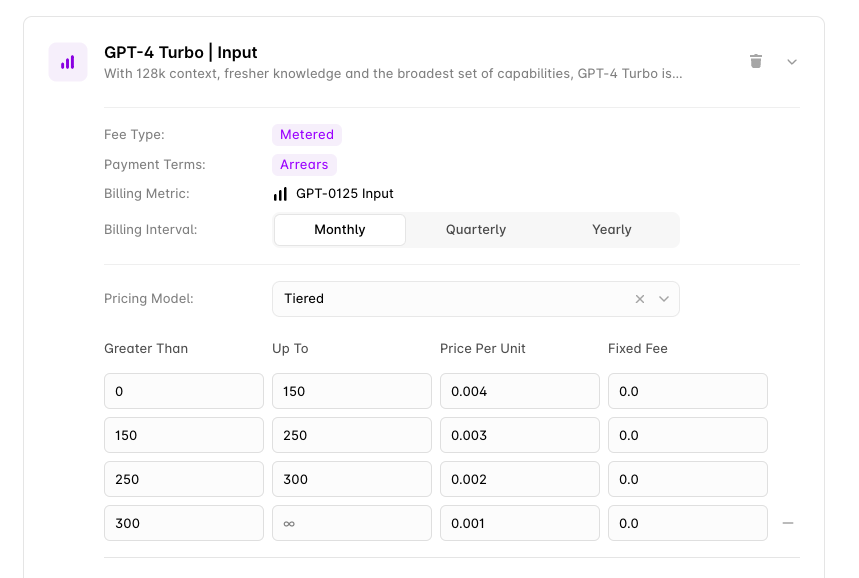
For metered products, you can set:
  • Billing Interval: Choose how frequently the product will be billed. For example, you can select Monthly, Quarterly, or Yearly intervals, depending on the plan’s structure.
  • Pricing Model: You can choose from a variety of pricing models to match your product’s billing structure.
You can review available Pricing Models.
Add Metered Products to Plan

Pricing Models:

  • Fixed: A consistent fee for the product, regardless of usage.
  • Unit: A fixed price per unit of usage, whatever the volume.
  • Tiered: The total usage decides which tier applies, and every unit is priced at that tier’s rate.
  • Graduated Tiered: Each tier is priced independently, so usage is split across the tiers it spans.
  • Prepaid Tiered and Prepaid Fixed Tiered: The customer prepays for an amount of usage, with overage charged beyond it.
  • Tiered Percentage and Graduated Percentage: A percentage fee that varies by tier, applied at the reached tier’s rate or graduated across tiers.
  • Volume Percentage: A percentage fee applied to the total value, often paired with a fixed per-event fee.
  • Expression: A custom formula over one or more metrics, for pricing that no standard model expresses.
  • Matrix: Routes each event to a priced cell by its property values, for pricing that varies along more than one dimension.
See Pricing Models for worked examples.

Custom Product Terms

In addition to global plan terms, you can apply custom terms to individual products. These terms apply only to the product they are set on and can include:
  • Trial Period: Offer a product-specific free trial, separate from the overall plan.
  • Minimum Spend: Set a minimum spend requirement for the product, regardless of usage.
  • Maximum Spend: Set a cap on the charges for the product within a billing period.
  • Discount: Apply a discount specifically for that product, useful for offering limited-time promotions or incentivizing customers to try new features.
These custom terms provide flexibility to tailor each product within the plan, ensuring you can meet a wide range of customer needs and billing structures.
Plan Contract Terms

Save and Manage the Plan

Once the plan is configured with products and terms, click Save Changes to finalize the setup. After saving, the plan will be available for use in customer subscriptions, quotes, and self-serve purchases.