> ## Documentation Index
> Fetch the complete documentation index at: https://alguna.com/docs/llms.txt
> Use this file to discover all available pages before exploring further.
# Managing Subscriptions
> Learn how subscriptions work in Alguna
In Alguna, a subscription represents the link between the customer and the pricing for products they subscribe to.
There are three ways to activate subscriptions in Alguna:
1. Activating via Dashboard or API using predefined [plans](/pricing/plans).
2. Activating after the customer signs the custom [quotes](/quotes/send-quotes).
3. Automatically activating when a customer completes self-sign up checkout.
***
## Subscription Lifecycle
Create and edit a subscription before sending it to a customer.
A subscription has been sent for internal approval.
A subscription was rejected in the approval flow.
A subscription has been sent to a customer for review and signature.
A subscription has been accepted by the customer.
A subscription has become active.
A subscription has been canceled and is no longer active.
***
 ## Activate via Dashboard
Once you add all the products you want as part of the subscription, you can activate it by clicking on **Activate Subscription**. The contract will be created with the start date and billing schedule for the associated products and terms you specified.
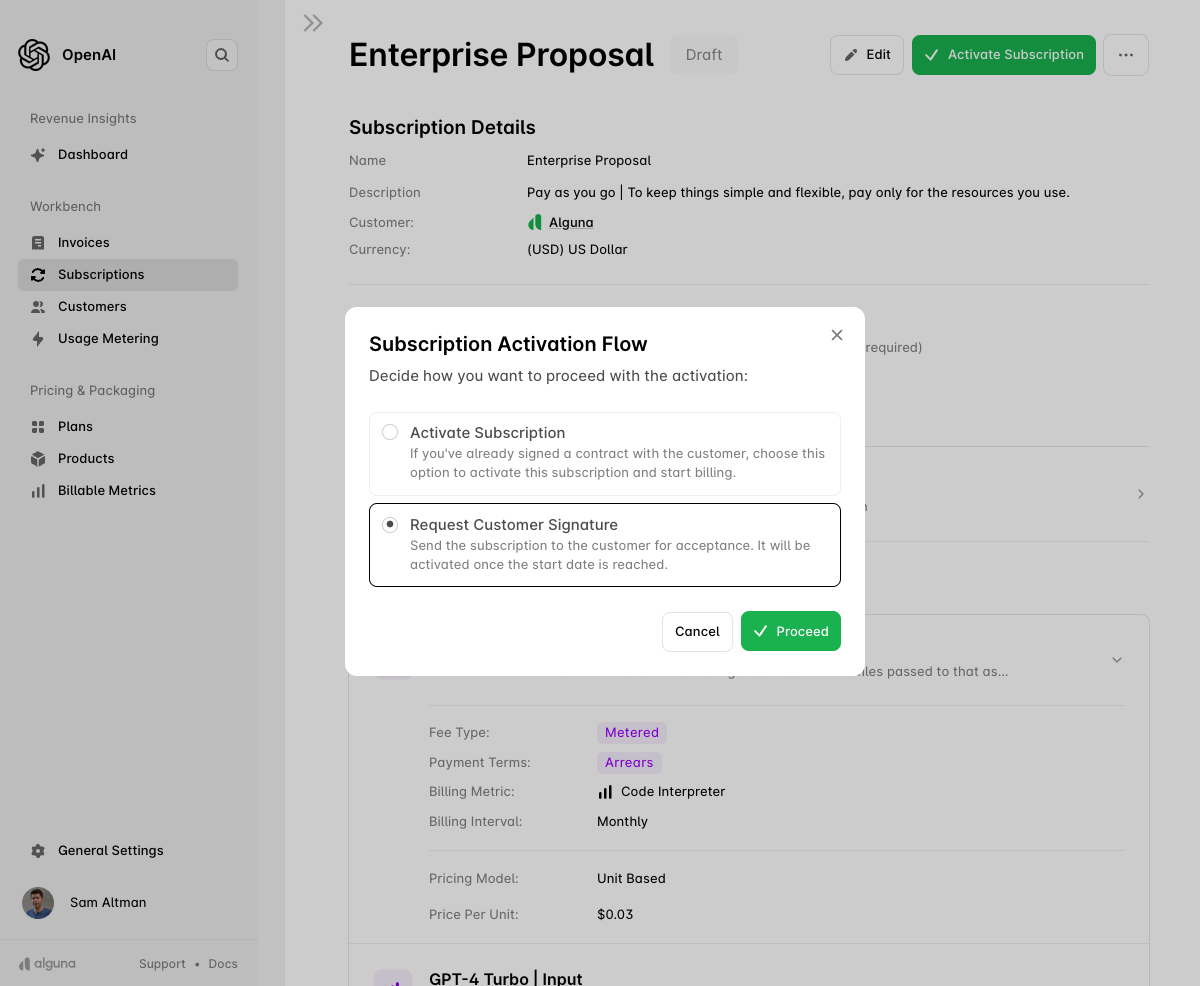
When you click **Activate Subscription**, you will be given the activation options:
* **Activate Subscription**: Use this option if you've already signed a contract with the customer and want to start billing immediately.
* **Request Customer Signature**: Choose this option to send the subscription to the customer for acceptance and signature. It will only activate once the customer signs and the start date is reached.
## Activate via Dashboard
Once you add all the products you want as part of the subscription, you can activate it by clicking on **Activate Subscription**. The contract will be created with the start date and billing schedule for the associated products and terms you specified.
When you click **Activate Subscription**, you will be given the activation options:
* **Activate Subscription**: Use this option if you've already signed a contract with the customer and want to start billing immediately.
* **Request Customer Signature**: Choose this option to send the subscription to the customer for acceptance and signature. It will only activate once the customer signs and the start date is reached.
 ***
## Activate After Customer Signs Quote
If you have already sent a [quote](/quotes/send-quotes) to the customer, the subscription will be automatically activated as soon as the customer signs and the contract start date is reached.
## Activate Automatically After Self-Serve checkout
If you have your own self-serve plans, you can activate them via the [API](/api-reference/overview) or **checkout**.
***
***
## Activate After Customer Signs Quote
If you have already sent a [quote](/quotes/send-quotes) to the customer, the subscription will be automatically activated as soon as the customer signs and the contract start date is reached.
## Activate Automatically After Self-Serve checkout
If you have your own self-serve plans, you can activate them via the [API](/api-reference/overview) or **checkout**.
***